
Creating an online casino account involves more than entering an email address. The process covers eligibility checks, document submission, security settings, and account activation, each step intended to meet regulatory standards and protect player funds. For users in Turkey, understanding these stages in advance cuts down on delays and sheds light on what the operator demands before real-money play can begin. This guide details the exact sequence, verification requirements, and troubleshooting steps that are relevant when creating an account at account kumarhane bwin Casino.
Establishing Eligibility Prior to Beginning the Registration Form
Prior to entering any personal details, the operator first establishes whether a visitor can legitimately establish an account. Age verification is the initial filter; Turkish law mandates participants to be at least 18 years old. The registration page requires users to enter their date of birth, and the system verifies this information against the identification documents submitted later. Residency rules follow: applicants must provide a Turkish identity number or a valid residence permit if they live outside Turkey but still wish to play. The platform rejects applications from jurisdictions where online gambling is banned, so users situated in restricted countries get an immediate notification rather than advancing to the next screen.
Payment-method availability is an additional eligibility factor. Bwin Casino accepts bank transfers, e-wallets, and certain prepaid cards; however, some Turkish-issued cards are rejected by international processors. Consulting the supported-methods list before registration eliminates later surprises when funding an account. Finally, the terms require that each individual open only one account. The system checks for duplicate email addresses, phone numbers, and IP addresses, automatically identifying attempts to create multiple profiles. Knowing these constraints before starting the form prevents wasted time and bypasses account-rejection notices. full article

Overseeing Ongoing Security and Updating Personal Details
Security is not confined to the sign-up phase. The account-security panel lets players to update their password at any time, provided the new password satisfies the complexity rules. Session-management tools display all active devices and allow remote logout if an unfamiliar location appears. IP-whitelisting is offered for users who access their account from a single, trusted network, adding another layer of restriction against unauthorized logins.
Personal details such as address or phone number can be changed through the profile section, but each change initiates a fresh verification cycle. A new utility bill aligned with the updated address must be provided, and the revised phone number needs SMS confirmation. These repeated checks protect both the player and the operator from identity theft. Regularly examining security settings and keeping contact information current minimizes the likelihood of future access problems.
Filling in Basic Profile Information on the Registration Page
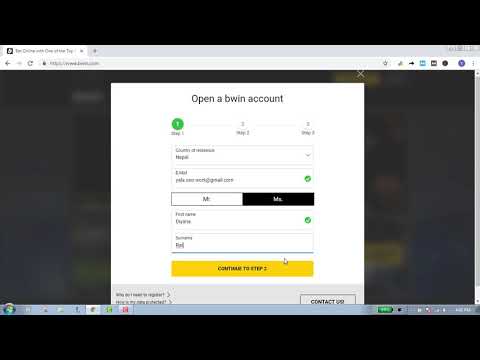
The registration form collects the data required to create a unique player profile. Users commence by providing a valid email address that will act as the primary login credential and the method for password resets. A password field follows, demanding a minimum length and a combination of upper-case, lower-case, and numeric characters. The form also requests a mobile-phone number, which is later employed for two-factor authentication codes. All fields are mandatory; leaving any blank prevents the form from proceeding to the next stage.
Players must also pick their preferred account currency from the options provided. Turkish Lira is available, but some users favor Euro or US Dollar to avoid conversion fees during deposits and withdrawals. The currency choice cannot be changed after the account is verified, so reviewing exchange-rate policies beforehand is advisable. Once the basic fields are complete, clicking the continue button initiates an automated check for format errors, such as an incorrectly structured phone number or an email address already registered to another profile.
Uploading ID Documents for KYC Verification
Know-your-customer rules demand every new account to be matched to a real person. The verification screen shows the acceptable documents and the quality standards each must satisfy. A government-issued photo ID, such as a Turkish national identity card, passport, or driver’s licence, is mandatory. The image must show the holder’s full name, date of birth, and a clear photo. A recent utility bill or bank statement functions as proof of address; the document must be dated within the last three months and display the same address entered during registration.
Files are uploaded in common formats: PDF, JPG, or PNG, each under 5 MB. The system conducts an immediate technical check for readability and integrity. If text is blurred or edges are cropped, the upload is rejected and the user is prompted to resubmit. Processing times differ; standard verification completes within 24 hours on business days, while peak periods may extend to 48 hours. Users obtain an email notification once the review is finished, along with any request for additional documents if discrepancies arise between the registration form and the supplied ID.
Acknowledging the Terms and Setting Communication Preferences
After profile details are submitted, the next screen presents the operator’s terms of service, privacy policy, and responsible-gaming guidelines. Each document loads in a new tab, allowing users to read the full text rather than relying on a summary. Acceptance is recorded by ticking a checkbox; without this confirmation the registration process pauses. The page also includes optional marketing-consent toggles for email newsletters, SMS promotions, and partner offers. These settings can be changed later in the account-preferences panel, but initial choices set the volume of messages received immediately after verification.
Players concerned about data usage should note the data-retention periods listed in the privacy policy. Bwin Casino states that personal information is kept for five years after account closure to comply with anti-money-laundering regulations. Understanding these obligations before clicking accept prevents later disputes over how long records remain on file. Once all boxes are checked, the form proceeds to the document-upload stage.
Depositing into the Account and Understanding Deposit Limits
After the account is verified and 2FA is active, the next essential step is completing a first deposit. The cashier page lists each available method alongside transaction times and fees. Bank transfers usually clear within one to three business days, while e-wallet deposits show up instantly. Minimum deposit amounts begin at 50 Turkish Lira for most methods, though certain prepaid cards need a higher threshold. Maximum single-transaction limits are displayed on-screen and can be adjusted by contacting support with a written request.
Players should also review the bonus terms associated to the initial deposit. Wagering requirements, game-weighting percentages, and maximum bet restrictions are detailed in the promotions section. Checking these conditions before confirming the transaction prevents misunderstandings about when bonus funds become withdrawable. Once the deposit is handled, the updated balance appears in the account overview, and real-money play can commence.
Recovering Access Following a Misplaced Password or Blocked Account
Account access problems are typical and typically arise from incorrectly entered passwords or consecutive failed login attempts. The login page features a “Forgot password” link that starts a reset sequence. Customers provide the registered email address, and the system sends a time-limited reset token. Selecting the link inside the email displays a form where a new password should be established and confirmed. The process normally concludes within ten minutes if the email provider processes promptly delivery.
Accounts can also be frozen after multiple incorrect 2FA entries. In such cases, the lockout period continues for 30 minutes, after which another attempt is permitted. Persistent lockouts require manual intervention from support staff, who verify identity through security questions or a fresh document upload. Saving the backup codes generated during 2FA setup in a secure location permits immediate recovery without waiting for support response times.
Enabling Two-Factor Authentication As Part of Onboarding
Security settings are configured right away after document approval. Two-factor authentication (2FA) is offered as an elective but highly advised step. The setup screen shows a QR code that must be scanned with an authenticator app such as Google Authenticator or Authy. Once linked, the app creates a six-digit code that updates every 30 seconds. Players type this code on the login page alongside their password, providing a second barrier against unauthorized access.
Users who prefer SMS-based 2FA can select that option instead; a verification code is sent to the registered mobile number. Both methods demand a backup code list, which the system produces during setup. These codes allow account recovery if the primary device is lost. Because 2FA is linked to the account from the first login onward, finishing the configuration before making a deposit stops future access issues when large balances are involved.
Common Questions
What is the duration of the entire sign-up process need?
Standard enrollment completes in under five minutes, but full verification relies on document review times. Typical identity verifications complete within 24 hours on business days, while additional document requests can extend the timeline to 48 hours. Users who upload sharp, complete files on the first attempt face the shortest delays.
Is it possible to change my account currency after verification?
No, you cannot. Currency selection https://www.reddit.com/r/Cleveland/comments/1o8cng1/mgm_resorts_to_sell_mgm_northfield_park_casino_to/ is locked once the account is verified to comply with financial regulations. Users must therefore choose their preferred currency before submitting identification documents. If an error occurs, closing the account and opening a new one is necessary, subject to the single-account rule.
What is the outcome if my documents are rejected?
The verification team sends an email listing the specific issues, such as poor image quality or mismatched address details. Players can send again corrected files through the same upload portal. Repeated rejections may lead to a support call to clarify requirements before the account can move forward.
Is 2FA mandatory?
Two-factor authentication is voluntary during onboarding but becomes compulsory after the first withdrawal request. Accounts without 2FA enabled get a notice to complete setup before processing any payout. This policy safeguards both player funds and the operator from fraudulent withdrawal attempts.
Do fees apply for depositing or withdrawing?
Most deposit methods involve no platform fee, although third-party processors may apply fees. Withdrawal fees are based on the chosen method and frequency; the first monthly withdrawal is typically free, while subsequent requests come with a fixed fee. Exact amounts are displayed on the cashier page before each transaction is confirmed.
